
Abstract
On Age of Empires IV I worked on the Xbox UI as a senior programmer, implementing several UI features and widgets. I built the groundwork for the radial menu, a key feature for the Xbox version. My focus with the radial menu was on responsiveness for the player and on making it dynamic both for ease of development and for the flexibility of use. I also worked on the hint system, creating a lot of the Xbox specific hints, and extending the text object to show inline button icons based on string tokens and keybinds. Completing these tasks required working across the C++ engine, gameplay code, xaml, C#, and lua based scripts with a custom editor.
Introduction
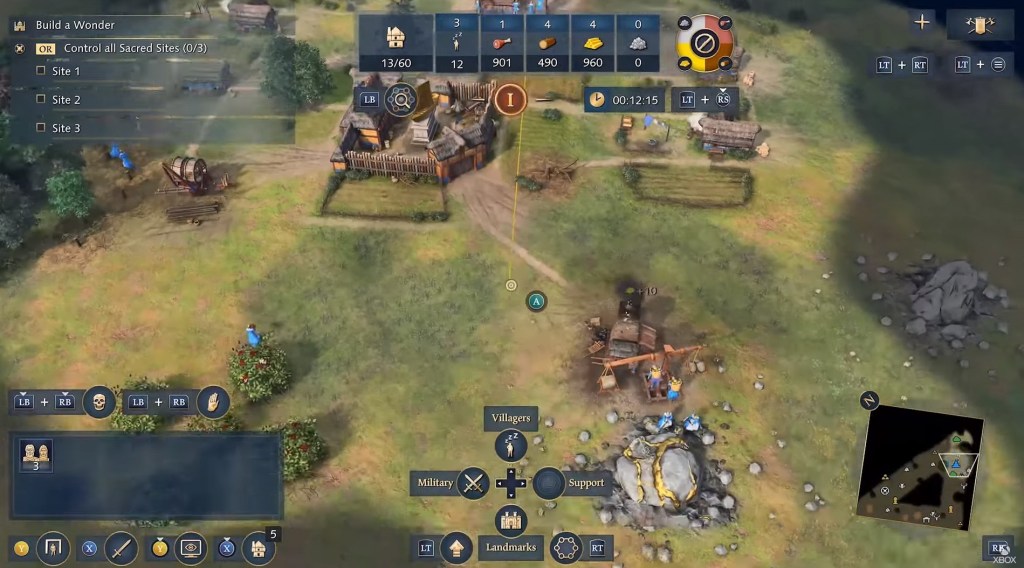
For a little over 2 years I worked on the Xbox version of Age of Empires IV as part of the Climax team supporting Relic along with Microsoft, Sega, and the World’s Edge team. I worked on the UI as a senior programmer, which meant I got to build some of the key features of the Xbox UI and was responsible for laying the foundations of the radial menu, Xbox specific hint systems, and several other UI elements.
Age of Empires is an iconic series of real-time strategy games. I’ve been a big fan of these games and other RTS games like it for a long time. Prior to working on Age of Empires IV I also played the game a fair amount since it launched on PC, and regularly watch competitive games on twitch. It was exciting getting to work on a game I enjoy playing and it’s nice to be able to add my name to a long list of other developers that have all been a part of Age of Empires.
Project Overview
There’s a lot of complexities working on a game like this. There’s a lot of different systems that all need to work together correctly across several layers that handle different parts of the game. On top of that it’s a live game, played at a competitive level, that is constantly being updated and improved. All this means that great care had to be taken to ensure that every little change and addition made to the game didn’t break any other features or decrease the game’s performance in any noticeable way, and would fit alongside any other updates that were still being worked on. To further add to that complexity, for the Xbox UI we had to support both gamepad and keyboard & mouse inputs which meant building essentially two completely new UI at the same time.
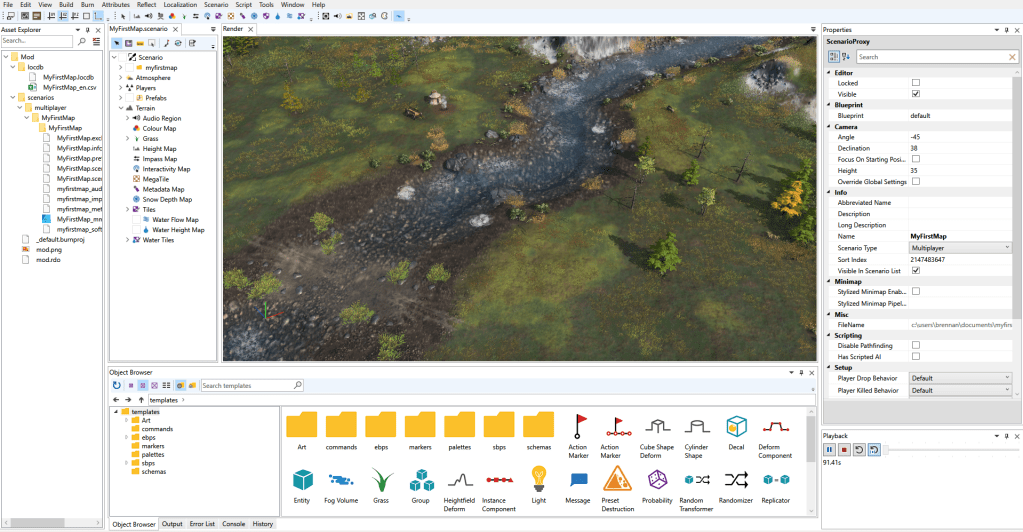
The codebase for Age of Empires IV is split up into distinct layers, that range from high level tools for artists and designers, down to the low level engine code. The core of the game is handled by the engine and gameplay code which is written in C++. Most of the UI behaviour is also defined here. Separate from that is the editor and the scripts, a lot of the gameplay is also created here along with the maps, game modes, campaign missions, UI flow, and hints. Anyone that has had a play around with the mod tools is likely familiar with this editor and the scripting language used. Finally on top of all that sits the visual UI tools which uses xaml and C#, this is where each UI page or widget is defined and the individual elements are positioned. We also define some basic UI behaviour in C# as a template for testing but this is later converted to C++ where everything gets finalised and polished for use in the actual game. Then there’s the interfaces that sit between each layer, including, C++ code that exposes low level functions for use in the scripts, and parses that read the xaml that defines the UI visuals, etc.
Building the Radial Menu
The radial menu is one of the most important features of the Xbox version of Age of Empires IV. On a game like this it’s crucial that this menu be as responsive and intuitive to use as possible. Just about every action in the game can be issued using this menu, from constructing buildings, to training units, to setting army formations, purchasing upgrades, and managing resources. There is absolutely no room for this menu to hang when opened, to lag as it loads in data, or to miss user inputs. For this reason the radial menu was one of the first things we started working on from the beginning and as one of the senior programmers on the project I was responsible for building the initial version that would lay the foundations for the rest of the UI team to build on top of.
A lot of the early work on the radial menu was investigative. With the help of a junior programmer we experimented with the UI system, testing out different ways that the radial menu could be built. Our focus was to find a method that was as dynamic and as lightweight as possible. In my experience prioritising simplicity and the ease at which code can be refactored or extended typically producers the best results. I felt it was also important to build the radial in such a way that allowed aspects of it to be dynamically altered at runtime, especially the number of segments it had.
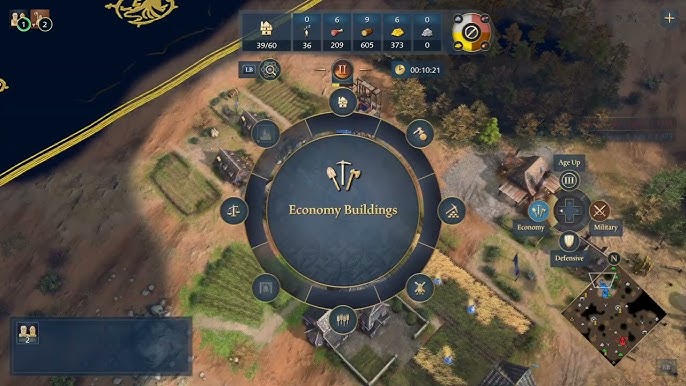
Even though It was initially decided that the menu would have a fixed number of segments, I was keen to avoid creating extra work and introducing bugs if the number of segments was later changed. It also meant that the design team could very quickly and easily trial different numbers of segments to see which worked best in practice. I’m really glad that this was something I pushed for, not only did it save time but it also ended up having a positive impact on the design of the UI. We made full use of that flexibility to alter the number of segments based on the context, in other terms based on what actions or buttons it was displaying to the player. Rather than sticking with the original plan of always having a set number of segments, which I think resulted in a better end product for the player.
One of the interesting challenges we faced with the radial menu was how to get the existing actions or issuables as they are known internally onto the radial menu. That’s all the buildings you can construct, the units you can train, the upgrades you can purchase, and all the unit commands you can issue. In a game like Age of Empires IV there are a lot of these actions that can be performed across many different civs and this is what makes this a challenge. The PC version of the game handles this through a system that pulls data from what is currently selected by the player, finds the issuables associated with the buildings and units that are selected, then feeds those into a buffer for the UI. As it does so there is metadata and rulesets applied that dictates the order the issuables should be displayed in and what to do when multiple issuables want to occupy the same index via a priority rating. Eventually this buffer of issuables or player actions gets displayed on the UI in a grid, that anyone who has played Age of Empires IV will know well.
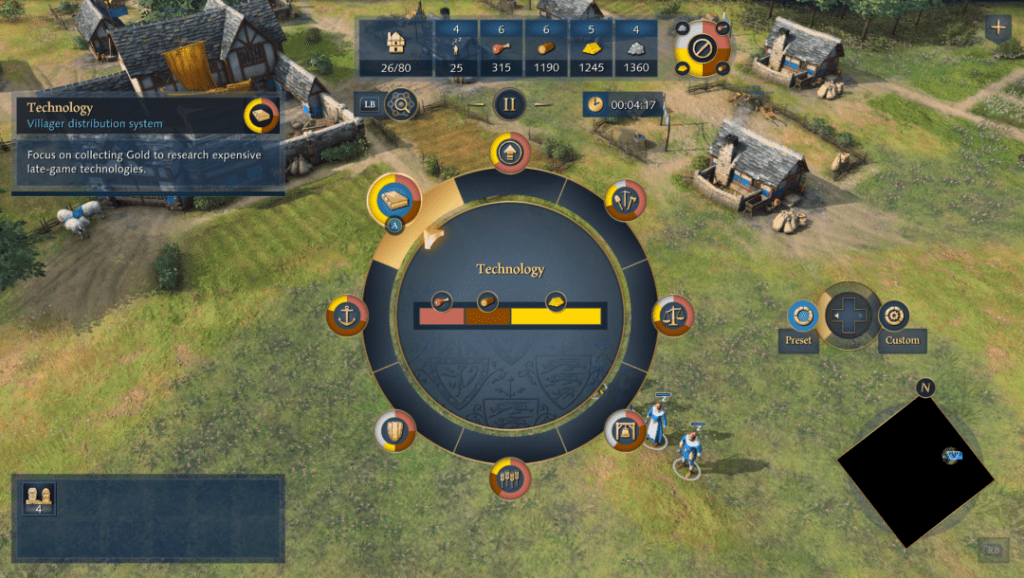
To get us up and running quickly and testing the radial menu I created a system along with a set of rules that sat alongside the one used for the PC issuables. It grabbed the data in the PC buffer and used that to construct a second buffer for the radial menu. At this early stage it simply converted the grid position into a radial segment and used the priority rating to decide what was shown first. The big difference with the PC grid version was that the radial menu was paged, so any issuables that were placed lower in the priority instead of getting removed from the UI would be placed on the next page with an available segment. This would also dynamically update if the segment count was changed at runtime. It wasn’t a perfect solution and it give us very little control over how the issuables were arranged around the radial menu but it meant that early on we could access all the same actions that were available on the PC version, which meant everyone working on this project could start playing the game on Xbox and testing their work. Eventually we built a more sophisticated solution where we could add extra metadata to issuables using the editor that gave designers complete control over what segment and page an issueable would be placed on, as well as a separate priority rating specifically for the radial menu.
Once I’d finished building the core of the radial menu other developers then later worked on it and refined it as it was needed for many different features. Tech and UI artists refined the look of the menu adding finalised graphics and animations. Designers set the metadata for all the issuables in the game and mapped out how the menu would be used across the game. Other programmers then refined the systems further, and built in support for different versions of the radial menu that would be needed for other features with actions unique to the Xbox version like the automated villager controls also known as the villager priority system.
Extending the Hint System
Age of Empires IV features a very extensive hint system with hints for just about everything you can do in the game along with prompts directing the player through campaign missions. Even in skirmish and multiplayer there are dynamic hints that can appear when certain parameters are met, these range from very basic features like showing the player how to move a unit if none have been moved, to more complex concepts like making use of civ specific bonuses.
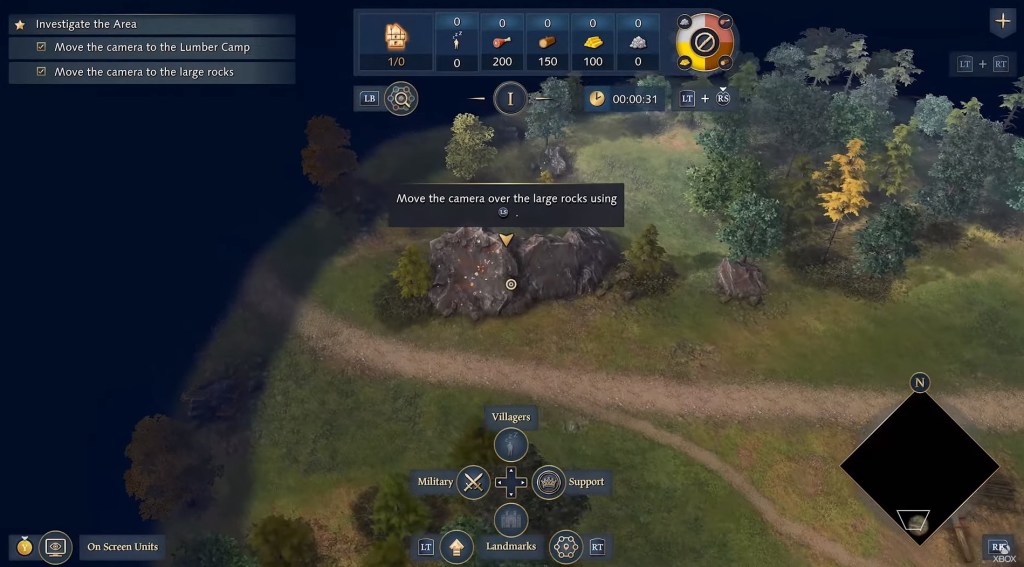
Hints come in a few different categories and styles, they can also be anchored to different game objects like units, buildings, or UI elements. The UI part of this is handled by adding anchor points to the UI xaml code on specific elements and giving them unique names like AgeUpIcon. The hints themselves are defined in the editor using scripts. Here you can create a hint or sequence of hints setting different parameters, like hint type, text to display, what triggers the hint, when to close the hint, and what the hint should be anchored to (or pointing to) using the unique anchor names.
For the Xbox version I created a couple of new styles of hint with adjusted visuals to better fit the Xbox UI. It was then a team effort to implement the new Xbox hints, it meant adding in lots of new anchor points across the UI, creating new C++ bindings to get new data from the engine/gameplay code, and then setting up each individual hint in the scripts. Creating one single new hint was relatively straight forward to do but with the large number of hints needed in a game like Age of Empires it becomes a big task and a big challenge to get them all implemented and to fully test that each hint works as intended.
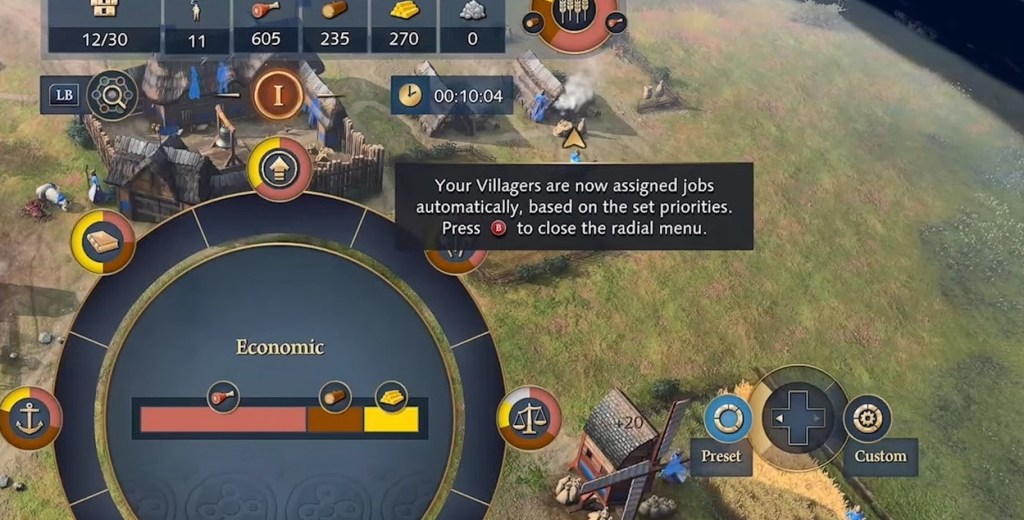
Probably the most interesting task I worked on in regards to the hints was implementing a way to display button icons within a line of text. In the PC version there was no need for this feature as hints were designed to show an image of what button to press on the left of the box separate to the text. Typically this would display that the action should be performed with the left or right mouse buttons. For the Xbox version however we wanted to be able to display Xbox button icons inline with the text, for use in the hints and other parts of the UI like load screen tips. Fortunately this is something that I have done in the past on previous games and the solution is usually the same. First I created a format for adding string tokens to our localised text data. This token would reference a keybinding or a specific button directly. I then extended the base text block object so that it would search any displayed text for these tokens. Once a token had been found it would be removed from the text line and at its location an icon would be added that was associated with the keybinding being referenced. When I’ve done this on other games I’ve also needed to implement a solution for displaying images in text lines, which involves getting the rendered pixel width and height of each character glyph to figure out where the icon should be drawn, how big it should be, and how large of a gap needs to be added before the text continues. Fortunately the UI system used in Age of Empires IV already had a way to wrap text around an image which made this a lot easier.
Here’s a video showcasing the Xbox version of Age of Empires IV. It also gives an overview of the challenges and goals of the Xbox version and the studios involved in making it happen.

 Craig Richardson
Leave a reply to Age of Empires IV on Xbox – Craig Richardson Cancel reply